


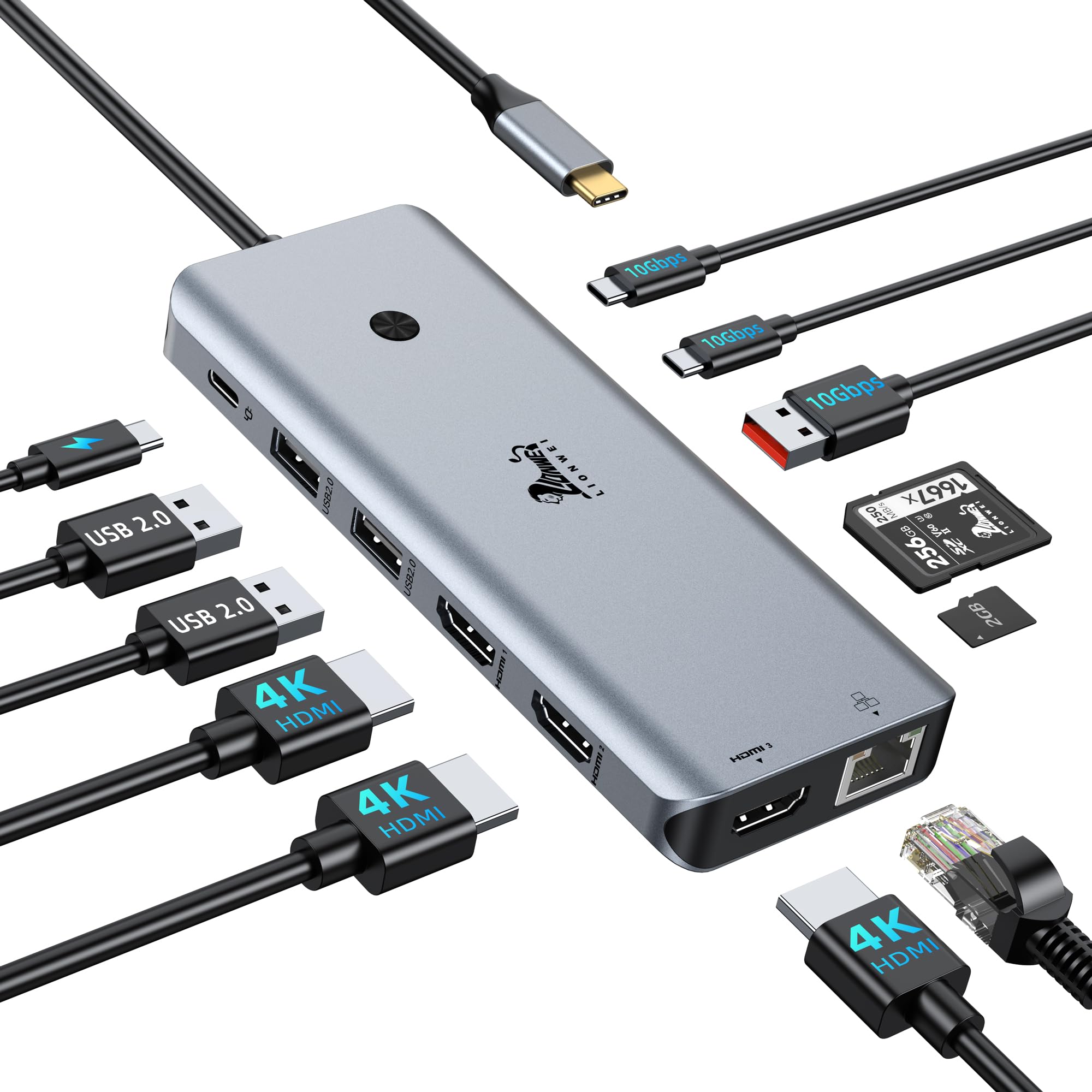
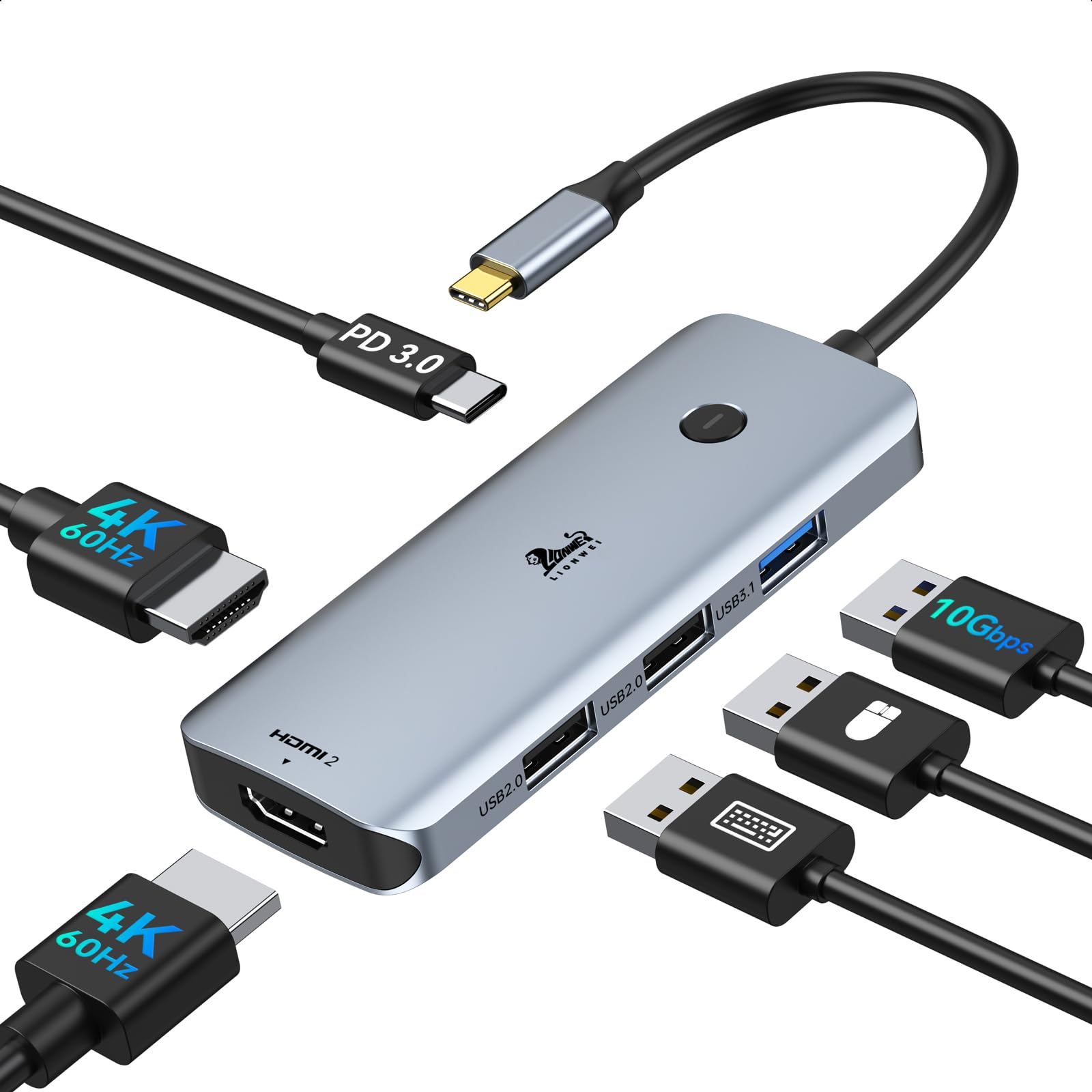



LIONWEI USB 3.0 a doppia stazione di docking HDMI per MacBook (Driver Needed)
9 sold in last 24 hours
- QUESTO HUB RICHIESTA INSTALL DRIVER: Si prega di collegare la stazione di docking usb 3 e aprire il "INSTANTVIEW", controllare le istruzioni sulla chiavetta USB. Permettete di controllare l'Unitore Utile per il vostro riferimento. Adattatore ideale per doppio monitor HDMI per MacBook Air/Pro M1 M1 pro M2, iMac/iMac Pro, PS4 Pro, Surface Pro, Chromebook Pixel, Dell, ASUS, HP, Lenovo e altri laptop Thunderbolt 3/4 o USB 3.0
- Permetteteci di sapere che se non riuscite a disturbare o non riuscite a disegnare i clienti. Trasformare una singola porta USB-C/USB 3.0 in 2 porte HDMI (1*HDMI 4K@30Hz e 1*1080P@60Hz) e 3 porte USB 2.0. La docking station USB 3.0/USB C dual HDMI consente di specchiare o estendere il display aggiungendo due monitor HDMI indipendenti
- HDMI Splitter Extended Display For Windows/Mac OS system: This HDMI extender splitter support both SST & MST. Support mirror or extend mode with crystal clear 3D visual and high quality video experience through 2 HDMI ports. RESOLUTION WILL BE 1080P@60Hz
- Advanced Chips: Support macOS 14 Sonoma, 13 Ventura, 12 Monterey, 11 Big Sur, 10.15 Catalina including MacBook Air/Pro (M1/M2 & Intel powered), 10.14 Mojave, 10.13 High Sierra, 10.10, 10.11 and 10.12. Windows 11, Windows 10, Windows 7, Windows 8.1. Android 7.1 and above
- 18-Month Warranty & Certified Safe:FCC, CE and RoHS certified.This USB-C Adapter combines 5 ports in one step solution including 1*1080P@60Hz and 1*4K@30Hz and 3*USB 2.0. With LIONWEI, you have 30 days to try out and 18 month's product and technical support
- Nota: Iit non funziona, si prega di aggiornare l'ultimo driver secondo il link del driver in vista istantanea
Tags |
Estimated shipping
Select a product to estimate shipping.Supporto per macOS System, Supporto MST
Modalità di uscita: A-B/BB/BC (fino a 4K@30Hz + 1080P@60Hz)
Modalità Specchio: A-A/AA (solo fino al doppio 1080P@60Hz)
Risoluzione HDMI ad uso singolo fino a 4K@30Hz
Compatibile con l'ultimo M1 Pro, M2 MacBook
Supporto per sistema Windows
Perché USB 3.0 Hub non funziona?
Please make sure the USB Hub has installed the correct driver according to the instruction. Because this USB 3.0 Hub is not using the USB C DP alt mode function, it can’t plug&paly.
Perché non posso utilizzare USB 3.0 Hub improvvisamente dopo l'aggiornamento del mio computer portatile?
Quando l'USB 3.0 Hub non può essere utilizzato dopo l'aggiornamento del sistema, si prega di andare a SM76x Driver Download.
Può funzionare su altri vecchi computer portatili USB A 3.0?
Sì, finché si scarica il driver per il sistema corrispondente, funzionerà.
Supporta la modalità estesa su MacBook?
Sì! Può funzionare con modalità di estensione su MacBook e anche MacBook M1 pro o M2. Non c'è alcun requisito per la porta del computer
Quale supporto otterrò?
Offriamo sinceramente supporto online 24 ore su 24, prova gratuita 30 giorni e 12 mesi Consigliere Tecnico e. Se ci sono problemi con il prodotto, vi aiuterò a risolvere il problema.
Product details


| Main Specification | |
|---|---|
| Dispositivi compatibili | Portatile or MacBook Air or MacBook Pro or Dell Latitudine or HP EliteBook |
| Produttore | LIONWEI |
| Dimensioni L x W x H | 3.9"L x 2.24"W x 0,7" H |
| Numero di porti | 5 |
| Marca | LIONWEI |
| UPC | 779139580355 |
| Numero di articoli | 1 |
| Dimensioni del prodotto | 3.9"L x 2.24"W x 0,7" H |
| Colore | Spazio grigio |
| Articolo Peso | 3.36 once |
| Product information | |
| Interfaccia hardware | HDMI or USB |
| Porte USB totali | 3 |
| Item details | |
| Numero del modello | LIUC0228 |
| Others | |
| Oggetto | USB C/ USB A a 2 Monitor HDMI or Compatibile con MacBook Pro/Air e Windows Laptop Extend Mode (installazione driver necessaria) |
| Tipo di prodotto | Docking Stations |
| Numero della parte Mfr | UC0228 |
| Versione minima del sistema operativo richiesto | Windows 7 |
| Numero totale di porte HDMI | 2 |
| Porte HDMI totali | 2 |