






Bouncefit D20 Y68 Fitness Band Smart Watch for Men, Women, Boys, Girls, Kids – Single Touch Interface, Water Resistant, Workout Modes, Quick Charge Sports Smartwatch – Pink
14 sold in last 24 hours
- NOTE- NO CALLING FEATURE-You will receive only notification to See Calls & Messages on Your Wrist, calendar, SMS, Social Media Notifications (Facebook, WhatsApp, LinkedIn, Instagram, and Twitter) notifications on display, fitness tracker band let you never miss the messages that matter.
- Water resistant smart fitness Watch with Bluetooth And Heart Rate sensor, Activity Recorder, Sleep Monitor, Calorie Counter, Call Notifications, Alarm, Message, Usb Charging Supports smart phones, Tablets and PC's and also support Android and IOS
- All-day activity tracking: Track steps, distance, calories burned, active minutes, you can check daily activity and time on OLED display or APP
- Single Touch Interface : The Screen of the Smartwatch offers a unique single touch interface, just tap on the Circle below the screen to navigate the menu, full screen touch is not available
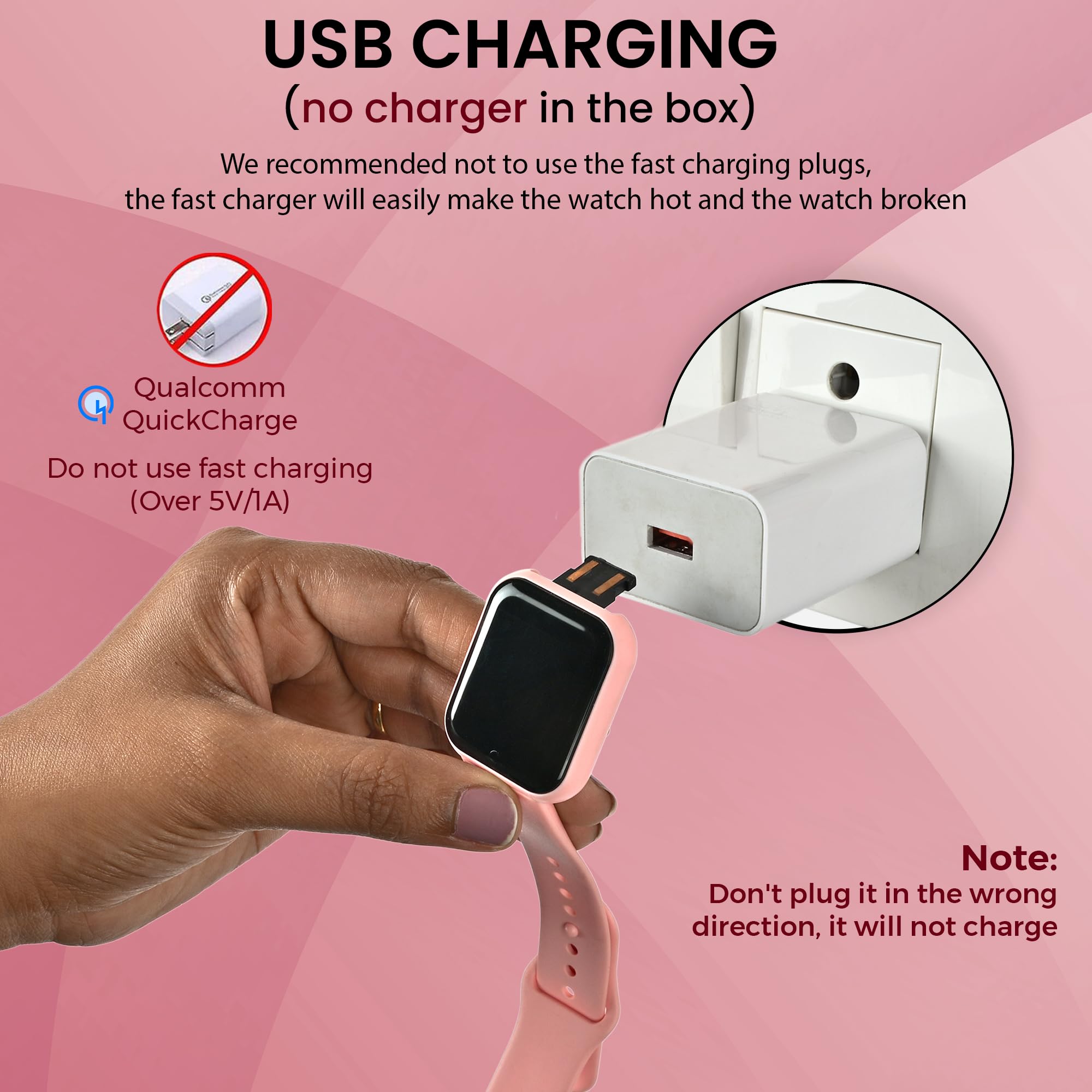
- NOTE - Charger is not available with this watch it has in built usb port (Yellow Strip on watch head). Directly insert the USB Port to any Standard Mobile Charger, Laptop, PC, Power Bank to charge. Compatible App - FIT PRO
Tags |
Estimated shipping
Select a product to estimate shipping.Charging Instructions:
- This Smartwatch does not come with a dedicated charger.
- Simply plug in the watch in any Standard Mobile Charger, Power Bank, Laptop or USB.
- If your smartwatch doesn't start charging after plugging it in, simply unplug it, flip it 180°, and plug it in again. Since the USB connector can be inserted in either direction, only one side provides the correct charging connection.
How to know it's charging:
A battery icon and charging indicator will appear on the watch screen. If you don't see the charging icon, flip the watch and reconnect it.
NOTE : Please charge atleast 2 hours before first time use.
How to Setup Smartwatch for the first time/How to Set Date and Time on Smartwatch -
Follow these simple steps to set up your watch:
Step 1 – Charge Your Watch First
Before using for the first time, charge your watch for at least 2 hours using any standard mobile charger or Power Bank .
Once charging starts, the screen will light up showing charging symbol.
Step 2 – Download the App
On your smartphone, go to: Store (for Android phones) OR Apple App Store (for iPhones).
Search for “FitPro” and install the app.
Step 3 – Turn on Bluetooth on Your Phone
Open your phone’s settings.
Switch Bluetooth ON .
Important: Do not connect the watch from Bluetooth directly. Always connect it through the Fitpro app.
Step 4 – Open the FitPro App
Open the Fitpro app and allow permissions (like Bluetooth, Location, Notifications).
Permissions are important so the watch can send alerts and sync health data.
Step 5 – Pair the Watch with the App
In the FitPro app, go to “Set” → “Bind Device to experience more features” (Highlighted in Green Colour).
Wait for the app to search → You’ll see a device name - 716 .
Tap it → The app will connect to your smartwatch.
Step 6 – Confirm Connection
Once connected, the watch will automatically update the time and date .
Your steps, sleep, and heart rate will start showing in the app.
You’ll also begin to receive call, SMS, and app notifications on the watch.
Troubleshooting (if not connecting)
Restart Bluetooth on your phone and try again.
If still not working, reset the smartwatch by navigating to More > Reset . Once Reset is done, try to connect the watch by following Step 5
Inside the app, tap Unbind Device , then Add Device again.
Keep the watch close to the phone (within 10 cm) while pairing.
FREQUENTLY ASKED QUESTIONS -
1. Which app is compatible with Smartwatch?
Download the “FitPro” app from Store or Apple App Store.
2. My watch is not turning on. What should I do?
Charge the watch for minimum 2 hours before first use.
It will power on automatically after charging.
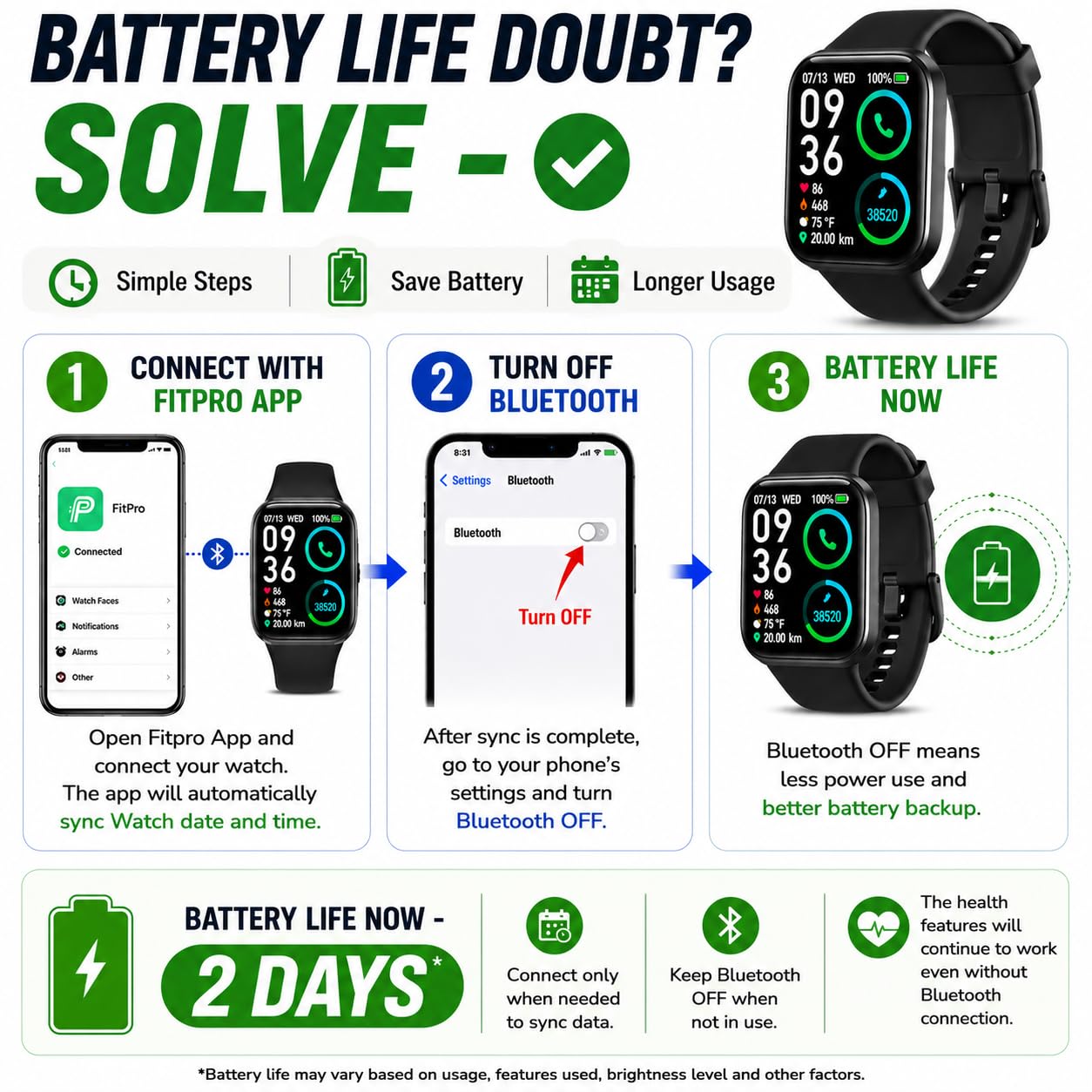
3. How can I extend battery life?
Connect the watch to the Fitpro app once to sync the correct time .
After setup, you may turn Bluetooth Off on your phone.
The watch will continue to display the correct time and count steps normally.
This method will extend Battery life significantly .
Product details


| Main Specification | |
|---|---|
| Udienza di destinazione | Donne or Ragazzi or Ragazze or Adulti Unisex or Bambini Unisex |
| Modelli di telefono compatibili | Dispositivi Android or Dispositivi iOS |
| Caratteristica speciale | Tracker di attività or Monitor di pressione sanguigna or Calorie Tracker or Memoria quotidiana di lavoro or Reminder Sedentario |
| Produttore | Matrix International, Matrix International |
| Conteggio unità | 1.00 Pezzo |
| Capacità della batteria | 150 ore |
| Input dell'interfaccia umana | Touch Pad |
| Tipo di comando | Controllo touch |
| Tipo di esposizione | OLED |
| Marca | Bouncefit |
| Tecnologia di connettività | Bluetooth |
| Capacità di memoria | 100 MB |
| Risoluzione | 240 x 240 |
| Forma | Piazza |
| Nome del modello | VD20 (1) |
| Livello di resistenza all'acqua | Resistente all'acqua |
| Dispositivi compatibili | Smartphone |
| Tipo di chiusura | Pulsante |
| Colore | Rosa |
| Product information | |
| Sistema operativo | iOS or Android |
| Tipo di garanzia | Limitazioni |
| Technical Details | |
| Tipo di cella della batteria | Ioni di litio |
| Tipo di sport | Multi-Sport |
| Potenza della batteria | 100 |
| Paese di origine | Cina |
| Item details | |
| Gamma di età Descrizione | Adulto or Bambini |
| Numero del modello | VD20 (1) |
| Nome dell'oggetto | Orologio intelligente |
| Style | |
| Nome di stile | Sports Strap |
| Measurements | |
| Articolo Dimensioni D x W x H | 30D x 30W x 4H millimetri |
| Dimensioni articolo | 30 x 30 x 4 millimetri |
| Others | |
| Caratteristiche del prodotto | Tracker di attività or Monitor di pressione sanguigna or Calorie Tracker or Memoria quotidiana di lavoro or Reminder Sedentario |
| Contenuto della scatola | 1 manuale di istruzioni X or 1 X D20 Smartwatch (No Charging Cable included as it it Direct Plug In Watch) |
| Informazioni di contatto Packer | Matrix International or Ph : 9560335864 |
| Importatore Informazioni di contatto | Matrix International or Ph : 9560335864 |
| Misurazione metrica | Ossigeno del sangue (SpO2) or Calorie bruciate or Conteggio or Distanza |
| Tipo di prodotto | Orologio intelligente |
| Applicazione supportata | Fitpro |
| Unità di misura del peso dell'oggetto | 0.08 Chilogrammi |
| Unità di misura della dimensione dello schermo | 3.04 Centimetri |
| Informazioni di contatto del produttore | Matrix International |
| Tempo di carica della batteria | 2 ore |
| Durata media della batteria | 1 giorno |
| Tipo di materiale del caso | Plastica |
| GPS Geotagging Funzionalità | No GPS |
| Tipo di materiale della banda | Silicone |
| Deprezzamento della resistenza all'acqua | 10 metri |
| Compatibile senza fili | Bluetooth |
| Caratteristica della comunicazione | Bluetooth |
| Tipo di computer indossabile | Orologio intelligente |
| Lunghezza della banda | 220 Millimetri |
| Memoria RAM Installata | 100 MB |
| Colore della banda | Pink |
| Larghezza della banda | 20 Millimetri |
| Tipo di chiusura | Fibbia gancio |